Public reply vs private DM
A public reply sits under the comment where everyone can see it, which shows the next reader that commenting works. The private DM carries the follow ask and the guide, and only that person sees it.
Instagram comment-to-DM automation sends a private message when someone comments a keyword on your post or reel. With QualifyBase’s Grow Followers recipe, that message asks them to follow you, checks the follow with Instagram, and then sends your free guide. People who already follow you skip the ask and go straight to the guide.
The method
It watches your posts and reels for a keyword. When someone comments it, they get a private message automatically, so you don’t have to answer each one by hand. A follow-gated flow adds one step: the person is asked to follow you before they get what they asked for.
A public reply sits under the comment where everyone can see it, which shows the next reader that commenting works. The private DM carries the follow ask and the guide, and only that person sees it.
A link in bio asks people to leave your post, open your profile and find the right link. Comment-to-DM brings the link to them in a chat, at the moment they asked for it.
A follow-gated flow, the Grow Followers recipe, asks for a follow first, so it suits a goal of more followers. An open flow, the “Send a link from comments” recipe, sends the link straight away.
Why it works
A keyword comment is a raised hand. The person has seen your post, liked your offer and asked for it, so a follow is a small next step.
A follow for a useful guide is easy to understand. They know what they get and what you ask for before they tap anything.
A public reply under each comment shows the next reader that commenting really gets them the guide.
What your new follower sees
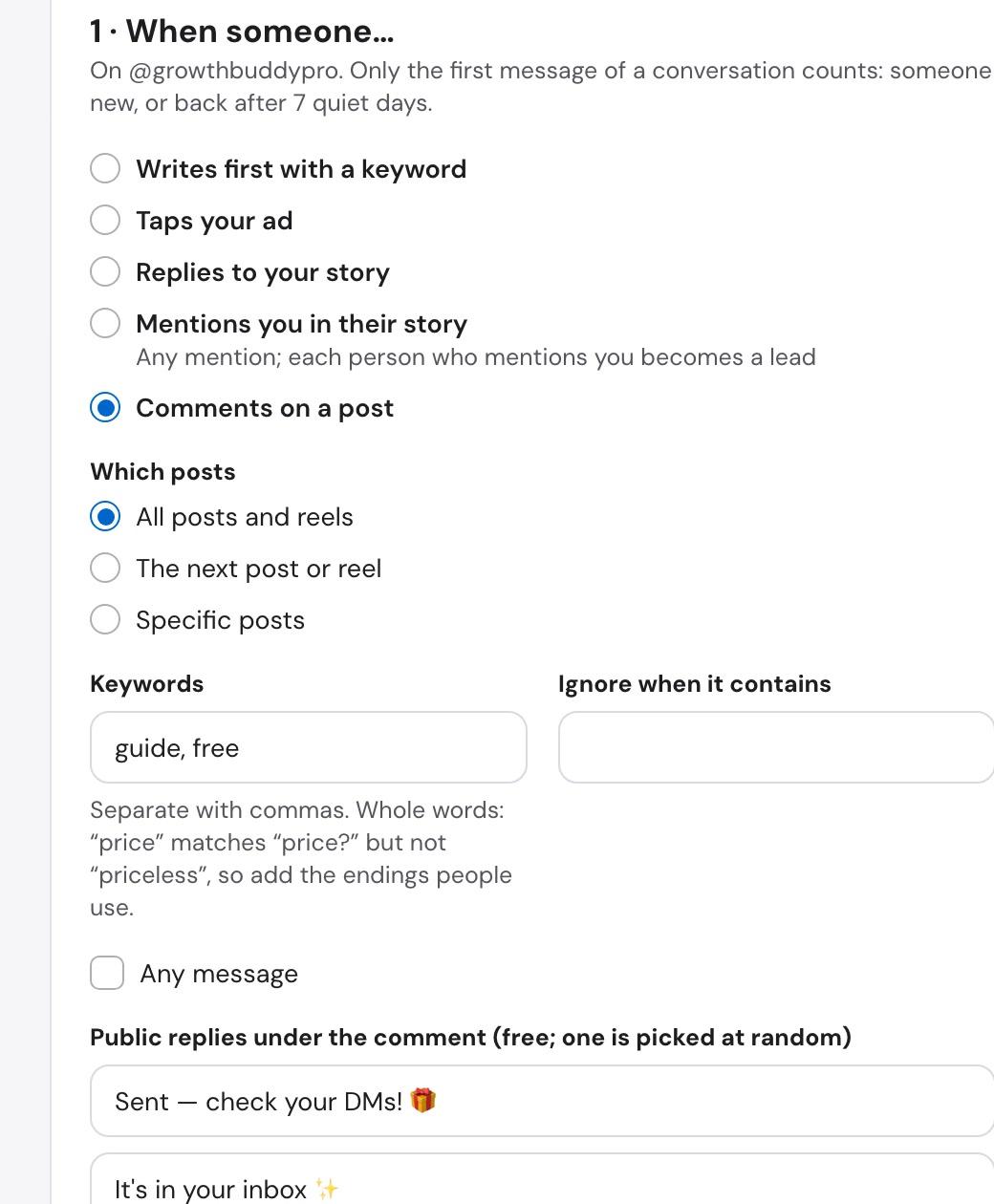
They write “guide” under your post or reel. QualifyBase matches whole words, so add the endings people really use.
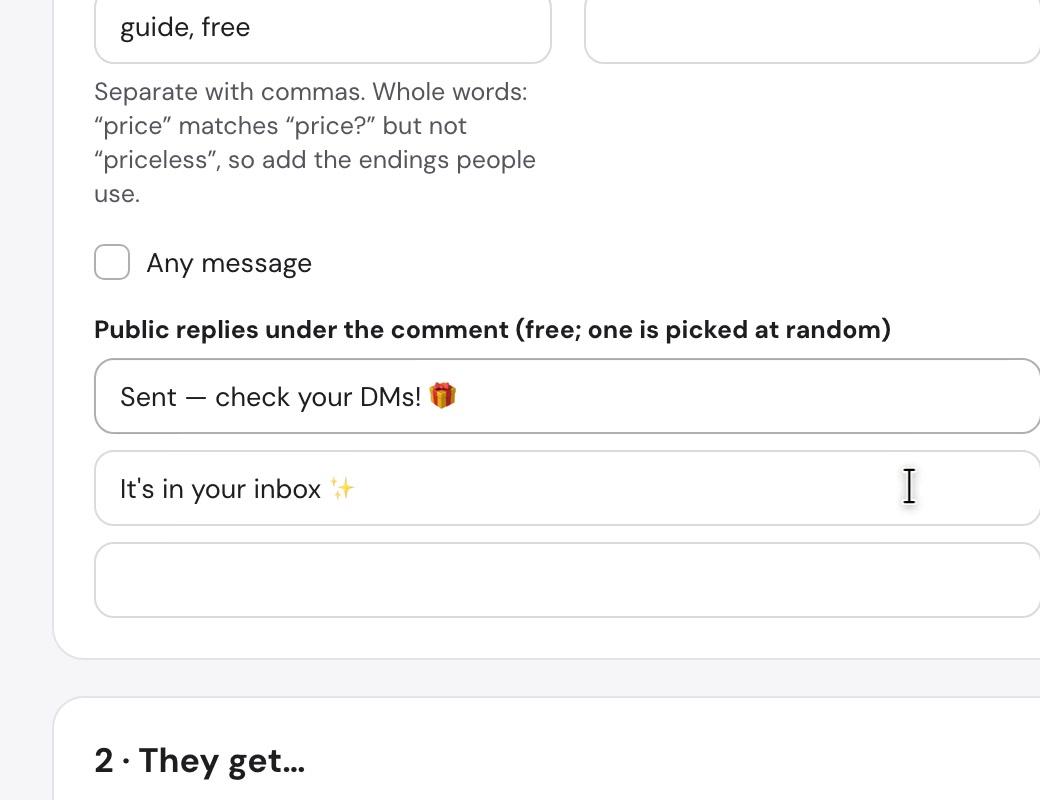
One of your public replies is picked at random, such as “Sent, check your DMs or message requests!”
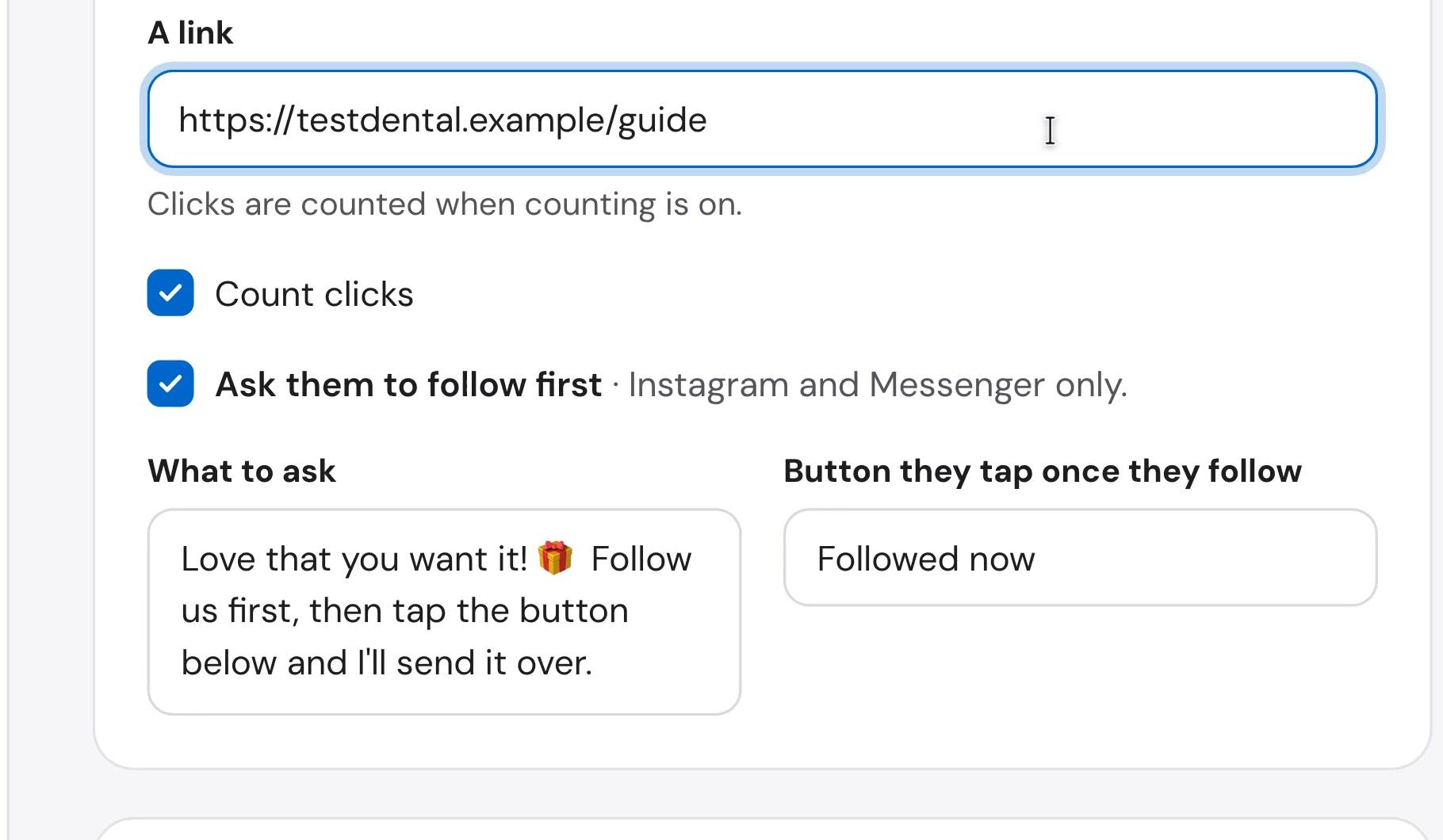
If Instagram says they already follow you, this step is skipped. Everyone else gets your message with a “Followed now” button.
QualifyBase checks with Instagram again. If they still don’t follow, the ask comes back with the button. Typing a reply doesn’t unlock the guide; only the button moves them on.
A short message, such as “You’re in! Tap below to grab it”, with a button like “Get the guide”.
The link arrives in the chat. Turn on click counting to see how many people open it.
See the setup
The QualifyBase panel, with the recipe’s own messages and a sample workspace. It has no sound, and every step is written out below.
Step by step
Before you start, connect your Instagram professional account and make sure you have credits. QualifyBase connects through Meta’s official permissions, listed in our privacy policy.
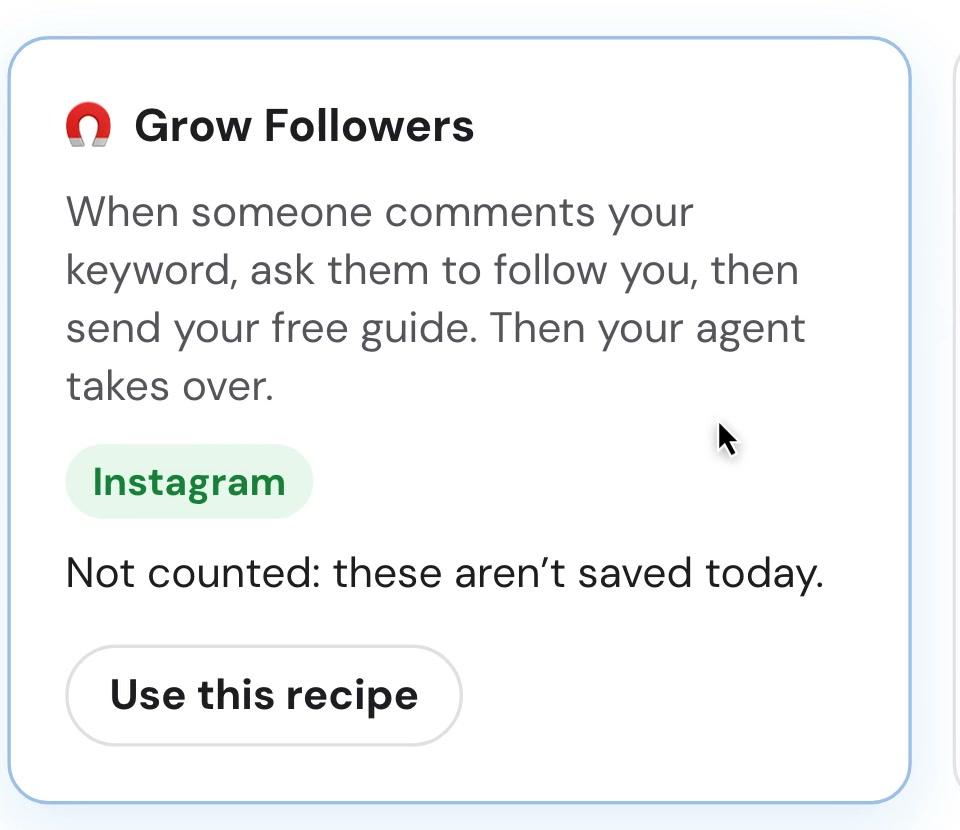
In QualifyBase, go to Settings, Integrations, Automations, then New automation. Grow Followers is under “Grow your audience”. It starts filled in with messages you can change, and they come ready in English, Turkish and Spanish.
Run it on all posts and reels, on the next one you publish, or on specific posts. Then set your keywords and, if you need them, words that should stop it from firing.
Add a few so they don’t all read the same. One is picked at random for each comment, and they cost nothing. The preview beside the form shows what people will see as you type.
Paste the guide’s link, keep “Ask them to follow first” on, and write what to ask and what the button says, then go live. Nothing follows the guide; if someone writes back, your account’s agent answers.
Your offer
The setup takes minutes. The offer decides whether anyone taps. Make it specific, useful right away and something only you could send.
One page they can use today, such as “The 10 questions to ask before you book a shoot”.
Something they would otherwise have to build themselves: a caption template, a Lightroom preset, a content calendar.
The answer people keep asking you for in the comments, saved once as a short PDF.
Example caption
“Comment GUIDE and I’ll send you the free checklist. Follow me first so it reaches you.”
If the offer is small, or the post is reaching people who have never heard of you, an extra step can cost you more than it earns. Use the “Send a link from comments” recipe instead: same keyword, no follow ask.
Measure it
Every automation on the Automations page shows messages sent, link clicks and new followers. A person counts as a new follower when they weren’t following at the ask and Instagram confirmed the follow after their tap.
Pricing
Pick a number and we’ll show you the plan that covers it. It only counts people this automation brings you. 7 days free on every plan. Cancel anytime.
~300
For about 300 a month, Starter fits: $40 a month.
For a single location getting started
billed monthly
$40 /mo
Room for 300-500 commenters a month
+$40 per extra 1,000 credits · 1 credit per text · 10 per voice min
Try 7 days for FreeFor teams running ads
billed monthly
$150 /mo
Room for 2,000-3,000 commenters a month
+$40 per extra 1,000 credits · 1 credit per text · 10 per voice min
Try 7 days for FreeFor high-volume and multi-branch teams
billed monthly
$500 /mo
Room for 6,600-10,000 commenters a month
+$40 per extra 1,000 credits · 1 credit per text · 10 per voice min
Try 7 days for Free7 days free, then billed monthly. Cancel anytime before the trial ends and you pay nothing. No setup fee, no minimum term.
| Starter | Growth | Pro | |
|---|---|---|---|
| Credits | |||
| AI credits per month | 1,000 | 6,000 | 20,000 |
| Text or voice from one credit pool | |||
| Extra credits | $40 / 1,000 | $40 / 1,000 | $40 / 1,000 |
| Voice | 10 credits / min | 10 credits / min | 10 credits / min |
| Agents and channels | |||
| Pipeline and booking | |||
| Reporting | |||
| Integrations and team | |||
| Support | |||
Yes. It asks Instagram before sending the ask and again when the person taps “Followed now”. If they still don’t follow, the ask goes out again. If Instagram gives no answer at that moment, the person is let through rather than kept waiting, so treat it as a strong check and not a guarantee.
If Instagram confirms they follow you, they skip the ask and go straight to the message with your guide button.
Plans start at $40 a month, with 7 days free on every plan, and you can cancel anytime. Use the calculator on this page to see which plan fits the number of followers you want.
No. You pay for the messages we send, never for followers. Anyone who follows you on their own, without going through the automation, costs nothing, and there is no limit on how many followers you can have.
It’s an estimate based on messages, at 1 credit each. Taking a commenter from keyword to follower takes 2 messages, the follow ask and the guide, or 3 if you also send the message with the button. Starter, with 1,000 credits, covers about 300-500 a month; Growth, with 6,000 credits, covers about 2,000-3,000 a month; Pro, with 20,000 credits, covers about 6,600-10,000 a month. It shows what a plan can cover, not a promise of followers: someone who is asked but doesn’t follow still uses a credit, someone who already follows and comments uses credits for the messages they get, and agent replies use credits if you keep your agent on.
No. The flow stops after the guide, and the agent never answers the automation’s own steps. Your Instagram account’s agent can’t be paused while the automation runs, and if someone writes to you later, that agent answers as usual.
Yes. The Automations page shows new followers for each automation, next to messages sent and link clicks. It counts people who weren’t following when they were asked and were confirmed by Instagram after they tapped. It doesn’t subtract anyone who unfollows later.
Instagram delivers a private reply to the Inbox if the person follows you, and to their Request folder if they don’t. Most people you ask won’t follow you yet, so the recipe’s public replies already tell them to check their message requests.
Check that the comment uses one of your keywords as a whole word, the post is one the automation runs on, and the automation is live. Your Instagram account’s agent also can’t be paused, and you need credits left. Test from a second account, because your own comments are ignored.
Comment replies use Meta’s private replies feature. Only one private message can be sent per comment, within 7 days of the comment on a post, ad or reel. The conversation can only continue once the person responds, and then within Instagram’s 24-hour messaging window.
Last updated 9 November 2026
7 days free on every plan. Cancel anytime before the trial ends and you pay nothing.